MySQL LEFT, RIGHT JOIN
MySQL joins are hard for beginners. At least for me when I was beginner.I will try to explain the joins in the simplest possible way.
Join in MySQL is a query where you can join one or more tables.
For example we have two tables: products and buyers with the following structures.
Table products:
mysql> SELECT * FROM products;
+----+--------------+--------------+
| id | product_name | manufacturer |
+----+--------------+--------------+
|  1 | Shoes        | Company1     |
|  2 | Laptop       | Company2     |
|  3 | Monitor      | Company3     |
|  4 | DVD          | Company4     |
+----+--------------+--------------+
4 rows in set (0.00 sec)
Table buyers:
mysql> SELECT * FROM buyers;
+----+------+------------+----------+
| id | pid  | buyer_name | quantity |
+----+------+------------+----------+
|  1 |    1 | Steve      |        2 |
|  2 |    2 | John       |        1 |
|  3 |    3 | Larry      |        1 |
|  4 |    3 | Michael    |        5 |
|  5 | NULL | Steven     |     NULL |
+----+------+------------+----------+
5 rows in set (0.00 sec)
Left Join
mysql> SELECT buyer_name, quantity, product_name FROM buyers LEFT JOIN products ON
 buyers.pid=products.id;
+------------+----------+--------------+
| buyer_name | quantity | product_name |
+------------+----------+--------------+
| Steve      |        2 | Shoes        |
| John       |        1 | Laptop       |
| Larry      |        1 | Monitor      |
| Michael    |        5 | Monitor      |
| Steven     |     NULL | NULL         |
+------------+----------+--------------+
5 rows in set (0.00 sec)
What happened?
Mysql starts with the left table (buyers). For each row from the table buyers mysql scans the table products, finds the id of the product and returns the product name. Then the product name is joined with the matching row from the table buyers. For unmatched rows it returns null.
To make it simpler, the above query is same as (except the unmatched rows are not returned):
mysql> SELECT buyers.buyer_name, buyers.quantity, products.product_name FROM buyer
s,products WHERE buyers.pid=products.id;
+------------+----------+--------------+
| buyer_name | quantity | product_name |
+------------+----------+--------------+
| Steve      |        2 | Shoes        |
| John       |        1 | Laptop       |
| Larry      |        1 | Monitor      |
| Michael    |        5 | Monitor      |
+------------+----------+--------------+
4 rows in set (0.00 sec)
Ruby On Rails 'Include' and 'Extend' example
Module level class method can't be available to any class use 'Include' Or 'Extend', Only modules instance methods available
When use include keyword for include a module into class it make module level instance method as to class level instance method
When use extend keyword for extend a module into class it make module level instance method as to class level class method
module Sample
def ins_mth; end
def self.cls_mth; end
end
class S1
include Sample
end
class S2
extend Sample
end
s1 = S1.new
s2 = S2.new
begin
S1.ins_mth
p 'Included modules instance method available as class Method'
rescue Exception => e
begin
s1.ins_mth
p 'Included modules instance method available as instance Method'
rescue Exception => e
p 'Included modules instance method does not available anywhere'
end
end
begin
S1.cls_mth
p 'Included modules class method available as class Method'
rescue Exception => e
begin
s1.cls_mth
p 'Included modules class method available as instance Method'
rescue Exception => e
p 'Included modules class method does not available anywhere'
end
end
begin
S2.ins_mth
p 'Extended modules instance method available as class Method'
rescue Exception => e
begin
s2.ins_mth
p 'Extended modules instance method available as instance Method'
rescue Exception => e
p 'Extended modules instance method does not available anywhere'
end
end
begin
S2.cls_mth
p 'Extended modules class method available as class Method'
rescue Exception => e
begin
s2.cls_mth
p 'Extended modules class method available as instance Method'
rescue Exception => e
p 'Extended modules class method does not available anywhere'
end
end
Out put of this code :
"Included modules instance method available as instance Method"
"Included modules class method does not available anywhere"
"Extended modules instance method available as class Method"
"Extended modules class method does not available anywhere"
Example code:
module Sample
def ins_mth; end
def self.cls_mth; end
end
class S1
include Sample
end
class S2
extend Sample
end
s1 = S1.new
s2 = S2.new
begin
S1.ins_mth
p 'Included modules instance method available as class Method'
rescue Exception => e
begin
s1.ins_mth
p 'Included modules instance method available as instance Method'
rescue Exception => e
p 'Included modules instance method does not available anywhere'
end
end
begin
S1.cls_mth
p 'Included modules class method available as class Method'
rescue Exception => e
begin
s1.cls_mth
p 'Included modules class method available as instance Method'
rescue Exception => e
p 'Included modules class method does not available anywhere'
end
end
begin
S2.ins_mth
p 'Extended modules instance method available as class Method'
rescue Exception => e
begin
s2.ins_mth
p 'Extended modules instance method available as instance Method'
rescue Exception => e
p 'Extended modules instance method does not available anywhere'
end
end
begin
S2.cls_mth
p 'Extended modules class method available as class Method'
rescue Exception => e
begin
s2.cls_mth
p 'Extended modules class method available as instance Method'
rescue Exception => e
p 'Extended modules class method does not available anywhere'
end
end
Out put of this code :
"Included modules instance method available as instance Method"
"Included modules class method does not available anywhere"
"Extended modules instance method available as class Method"
"Extended modules class method does not available anywhere"
Remove the Adverticement In free Domain
Now We are goind to discuss " How to Remove the Adverticement In free Domain? "
Just very simple to use javascript
first of all u need to add a common div to cover your all content in page like this body element
put an Id to "#page"
Now i am going to filter my div element from other elements using simple javascript
$(document).ready(function(){
var fav_count = document.body.childNodes.length;
for (var i = 0; i < fav_count; i++) {
if(document.body.childNodes[i].tagName){
if(document.body.childNodes[i].id !="page"){document.body.childNodes[i].style.display="none"}
}
}
});
In this script file load when the document is ready.
Change Or Set the Address Bar Search
If any application installisaion change your Firefox default search enginees configuration then you don't worry about yourself
1.Just Open the Firefox
2.Enter "about:config" in your firefox address bar

.png)
3.In Filter enter "keywork"

4.Enter the following URL's for set your favorite search engines
- Google Browse By Name: http://www.google.com/search?ie=UTF-8&sourceid=navclient&gfns=1&q=
- Google I’m Feeling Lucky: http://www.google.com/search?ie=UTF-8&btnI=&q=
- Google Default: http://www.google.com/search?ie=UTF-8&q=
- Yahoo Search: http://search.yahoo.com/search?p=
- Bing Search: http://www.bing.com/search?q=
- Ask: http://www.ask.com/web?q=

Applying for a job? Tips to perfect your resume
 Here's a look at the significance of formatting, proof-reading, action words and stating the truth in your resume
 Elements of presentation
One of the important aspects of writing a resume is using the right font size, type and colors. Font sizes between eleven and twelve are considered readable for a resume. You may want to avoid default font selection from your system. Select a font that is popular but not boring. Separate font types for printing and internet resumes
There are separate font types for printing and internet resumes.
Choose the font type based on your target usage. Do not have more than three font types in your resume. You can have one for the resume title, one for the section title and one for the body of the resume.
Limit the usage of italics, bold and all caps - use them only to grab attention. Do not have entire sentences formatted with italics, bold or all caps.
There are no clear rules when it comes to the use of font colors. However, it is good to be conservative and stay within black, blue and darker shades of grey. It is better to avoid the use of red or have a resume that ends up looking like a print advertisement.
Use logos to depict specific qualifications
You can use logos to depict specific qualifications and achievements. On a related note, photos are to be avoided unless the job position has a direct connection to physical appearance.
While presenting skills and achievements, imply the benefit of such skills using action words. Examples of action words are 'target-driven','self-
A quick checklist of additional things-to-do:
- Avoid the usage of non standard acronyms, slangs and jargons
- Do not state the obvious, as in 'references available' 'available for interview'
- Limit the key information in the first page of your resume
- Limit the resume to two pages - if you really have more information, carry a separate document for the interview
- If you have a serious hobby, mention it; be prepared to discuss it in detail
- Avoid negative statements
- Avoid writing in passive voice - use active voice; your grammar check tool can help you do this.
Proof-reading
Proof-reading should be done as a separate exercise and not along with resume writing. Give a time gap after writing; keep your mind fresh and concentrate. The objective is to find faults in your resume and clean it up. Write down mistakes that you see rather than correcting them immediately.
When proof-reading ...
- Look for words that you do not understand and replace them
- Ensure that the punctuation is right
- Read the resume backwards and capture more mistakes. Once you have completed a review and written down the mistakes, do the exercise again.
Article Courtesy - Economic Times
Java Script for get the Capitalized First characters.
Very Very Simple steps for capitalise your string in jQuery....
$('#text_field').blur(function() {
var abbreviation = this.value.match(/[A-Z]/g).toString().replace(/,/g,"");
var abbreviationField = document.getElementById('institute_abbreviation');\\
abbreviationField.value = abbreviation;
});
In here "#text_field" text_field is text_field id with id identifier # symbol
the
blur event is sent to an element when it loses focus. Originally, this event was only applicable to form elements, such as <input>. In recent browsers, the domain of the event has been extended to include all element types. An element can lose focus via keyboard commands, such as the Tab key, or by mouse clicks elsewhere on the page.
in side the blur function 1. abbreviation variable get the string like ABC from the "Above Befor Call" string
this.value.match(/[A-Z]/g).toString().replace(/,/g,"");
"this" means current element of the html page.
Working with Google Visualization Chart in Rails
Working with Google Visualization Chart in Rails
rails 2.3.5 is also comfortable easy to use Google visualisation chart
Step 1: Install the Ruby gem GoogleVisualr...
Enter this Command in Console gem install google_visualr
Step 2: After Completing the install use the “visualr” gem
----------
In Controller Add the following line
@data_table = GoogleVisualr::DataTable.new
Now the data_table object is created and ready for get the chart data
In View Insert the lines
<% data_table=Model.Modelmethod(@data_table)%>
* Model.modelmethod will return the chart data like
<% opts = { :width => 700, :height => 250} %>
<% @chart = GoogleVisualr::Interactive::ColumnChart.new(data_table, opts)%>
<div id='chart'></div>
This Division as id “chart” is replaced by Google Chart from the following line
<%= render_chart(@chart, 'chart') %>
Replace the Chart in the Div id contain the “chart”
Chart Configuration Options are available on this following link :
https://developers.google.com/chart/interactive/docs/gallery/columnchart#Configuration_Options
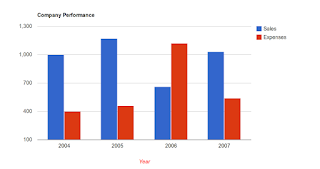
rails 2.3.5 is also comfortable easy to use Google visualisation chart
Step 1: Install the Ruby gem GoogleVisualr...
Enter this Command in Console gem install google_visualr
Step 2: After Completing the install use the “visualr” gem
----------
In Controller Add the following line
@data_table = GoogleVisualr::DataTable.new
Now the data_table object is created and ready for get the chart data
In View Insert the lines
<% data_table=Model.Modelmethod(@data_table)%>
* Model.modelmethod will return the chart data like
data_table.addColumn('string', 'Year');
data_table.addColumn('number', 'Sales');
data_table.addColumn('number', 'Expenses');
data_table.addRows([
['2004', 1000, 400],
['2005', 1170, 460],
['2006', 660, 1120],
['2007', 1030, 540]
]);
<% opts = { :width => 700, :height => 250} %>
These are the optional properties for the chart
<% @chart = GoogleVisualr::Interactive::ColumnChart.new(data_table, opts)%>
Create chart
<div id='chart'></div>
This Division as id “chart” is replaced by Google Chart from the following line
<%= render_chart(@chart, 'chart') %>
Replace the Chart in the Div id contain the “chart”
Chart Configuration Options are available on this following link :
https://developers.google.com/chart/interactive/docs/gallery/columnchart#Configuration_Options
Ex: Column Chart.

Subscribe to:
Posts
(
Atom
)